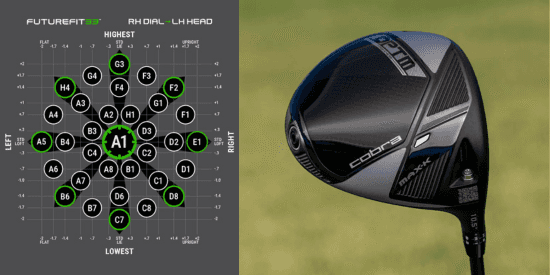
Adjustable drivers, fairway woods and hybrids are only useful if golfers understand what the settings actually do.
That is where Cobra Golf’s FutureFit33 system becomes valuable. Available in Cobra’s latest OPTM and DS-ADAPT metalwoods, FutureFit33 gives golfers and fitters 33 unique loft-and-lie settings, with adjustments of up to plus or minus two degrees.
For the average player, the benefit is not simply having more settings. It is having more ways to match a club to a specific ball-flight problem.
A golfer who launches the ball too low may need more loft. A player who regularly misses right may need a different lie setting. Someone who hits the ball high with too much spin may need a different setup altogether. FutureFit33 gives golfers and fitters a structured way to test those changes instead of guessing.
Key takeaway: FutureFit33 is not about testing all 33 settings. It is about finding the setting that best improves a golfer’s most common miss, launch window or shot pattern.
How to use FutureFit33
Cobra’s FutureFit33 guide starts golfers in the A1 setting. From there, players hit 5-10 shots and identify their typical ball flight. Based on that pattern, Cobra’s guide recommends a setting and nearby options to test.
That process is important because adjustable clubs should be tuned around patterns, not single swings. One perfect shot does not mean a setting is right. The better question is whether the adjustment improves the golfer’s common miss, launch window or dispersion over several shots.
What golfers should watch
Start direction: Is the ball beginning too far right or left?
Ball flight height: Is the launch too high, too low or in the right window?
Shot pattern: Is the overall dispersion getting tighter?
If the ball is starting too far right or left, lie angle may matter. If the ball is launching too high or too low, loft may matter. If the pattern tightens, the setting is probably moving in the right direction.
The best results will still come from working with a qualified fitter and launch monitor, but Cobra’s guide gives golfers a practical starting point.
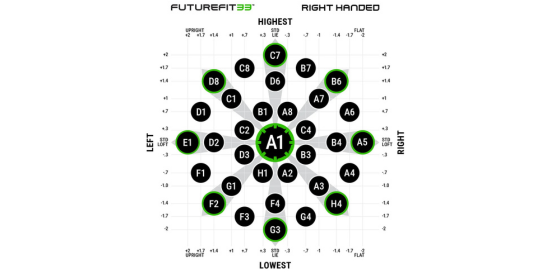
FutureFit33 Settings for Right Handed Golfers
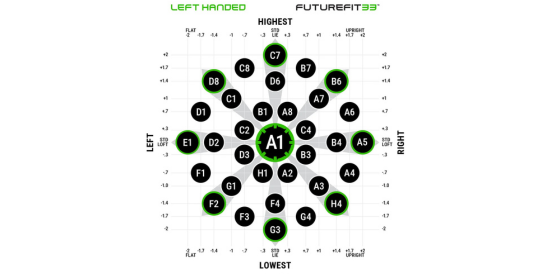
FutureFit33 Settings for Left Handed Golfers
View Cobra’s FutureFit33 Guide
What loft and lie adjustments do
FutureFit33 allows players to adjust loft and lie independently across 33 settings.
Loft primarily influences launch, spin and trajectory. Adding loft can help a player launch the ball higher and potentially increase carry. Reducing loft can help lower flight and, for some players, reduce spin.
Lie angle can influence start direction and shot shape. A more upright or flatter setting may help a golfer change how the club sits and delivers through impact.
That does not mean every golfer should immediately start changing settings. Small adjustments can create noticeable changes in ball flight, so the best approach is to change one variable at a time, test it, and compare the results to the original A1 setting.
How Cobra’s broader adjustability system works
FutureFit33 is only one part of Cobra’s fitting system. Cobra’s Adjustability Guide also explains how moveable weights can influence performance in certain models.
The easiest way to think about it: the hosel changes loft and lie, while the weights change how the head performs.
In Cobra’s OPTM metals, moveable weights can influence center of gravity, launch, spin, forgiveness and shot bias. That gives golfers and fitters another way to solve ball-flight issues.
For example, some weight settings are designed to increase forgiveness and stability. Others can help influence accuracy, launch, spin or fade/draw bias depending on the model.
That is useful because two golfers can produce the same miss for different reasons. One player may need a loft or lie change. Another may benefit more from a weight change. In many cases, the best fit comes from testing both.
View Cobra’s Adjustability Guide
How to adjust a Cobra club
Cobra says golfers can use the Cobra wrench or any T25 torque wrench to adjust loft, lie and weight settings.
For weight changes, loosen the weights by turning the wrench counterclockwise, place the heavier weight in the desired position, then tighten clockwise until the wrench produces one audible click. Cobra warns against tightening weights by hand because they may come loose during the swing.
For hosel adjustments, golfers should follow Cobra’s FutureFit33 chart or interactive guide and test changes carefully. Avoid jumping between random settings. Start from A1, make one change, hit enough shots to see a pattern, then compare the result.
What Cobra’s adjustable weights can change
Cobra’s Adjustability Guide shows that different models use different weight systems.
OPTM LS driver: Uses a three-weight system that can be configured to influence forgiveness, accuracy or fade bias.
OPTM X driver: Uses a two-weight system to help golfers choose between accuracy and forgiveness.
MAX-K and MAX-D models: Use fixed weight positions designed around stability, forgiveness, launch and draw-bias help.
The important takeaway is that not every Cobra head is built for the same player. A golfer who needs lower spin may fit one model. A golfer who needs help launching the ball or reducing a slice may fit another. The adjustability system helps fine-tune the model, but choosing the right head still matters.
Where FutureFit33 fits in Cobra’s technology
FutureFit33 is the next step in Cobra’s adjustable club technology.
Earlier Cobra systems gave golfers multiple loft settings to tune launch and trajectory. FutureFit33 expands that idea by adding more precise loft-and-lie combinations, giving fitters more ways to address direction, launch and dispersion.
That added flexibility is helpful, but it should be used with a purpose. The goal is not to test all 33 settings. The goal is to find the setting that best improves the golfer’s most common ball-flight issue.
Why it matters for amateur golfers
Most amateurs do not need more complexity. They need equipment that can be matched more closely to the way they actually deliver the club.
That is the real value of FutureFit33. It gives golfers more room to fine-tune ball flight without immediately changing shafts, changing heads or buying a new club. As a player’s swing changes, the club can be adjusted again.
For competitive amateurs, that can be useful when trying to optimize carry distance, tighten dispersion or create a more reliable tee shot. For everyday players, it can mean a better launch window, fewer big misses and more confidence that the club is set up for their swing.
FutureFit33 does not replace a proper fitting, and it will not fix every swing issue. But it does give golfers and fitters a more precise starting point.
For players considering Cobra metalwoods, the value is straightforward: FutureFit33 gives you more ways to make the club fit your ball flight, instead of forcing your ball flight to fit the club.