By Jeff Newton, Callaway Golf
Here are all the ways you can make adjustments to your Big Bertha Driver, including the Gravity Core
We recommend that you make adjustments in the order below.
1. LOFT options
• stated loft (S)
• stated plus one degree (+1)
• stated plus two degrees (+2)
• stated minus one degree (-1)
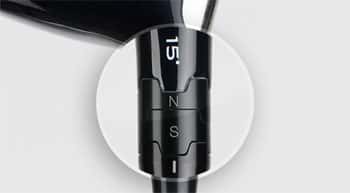
The loft helps you adjust launch angle and backspin to influence trajectory. The club comes set in the stated “S” position. To change the loft, loosen the screw at the bottom of the shaft and rotate both cogs until the loft setting you want is aligned with the white hash mark on the shaft and the stated loft marked on the driver. Tighten the screw until you hear a click.
Note: Your desired loft may appear on the upper or lower cog, depending on loft and lie angle combination.
2. LIE options
• Neutral (N)
• Draw (D)
Once the loft has been determined, hold that cog in place while you rotate the other cog between Draw “D” and Neutral “N”. This will change the lie angle and influence the starting direction of your shots.
If you want to minimize a slice or enhance a draw, rotate the lie cog to the Draw “D” position, which will make the lie angle more upright. If you want to work the ball both ways, for either a fade or a draw, rotate the cog to the “N” position.
Remember that this designation could appear on the upper or lower cog, and make sure the desired setting is aligned with the white hash mark on the shaft.
Always tighten the screw until you hear a click.
The figure below illustrates the do’s and don’ts for adjusting your hosel settings:
3. HEEL/TOE WEIGHTING options
• 1 gram
• 3 gram
• 5 gram
• 7 gram
The club comes with a 7 gram weight in the heel of the club and a 1 gram weight in the toe to promote a slight draw bias. For a more neutral, workable ball flight, or more of a fade bias, switch the placement of the screw weights, moving the 7 gram weight to the toe of the club and the 1 gram weight to the heel.
You can also create a wide range of draw/fade settings by utilizing the 3 and 5 gram weights.
Always tighten the screws until you hear a click.
4. GRAVITY CORE options
• Core up
• Core down
This revolutionary technology allows you to adjust the vertical Center of Gravity of your Big Bertha Alpha Driver. The club comes with the Gravity Core in the high CG position, which usually promotes more backspin and a higher trajectory.
To promote a more penetrating trajectory with lower backspin, loosen the aluminum cap in the bottom of the club, remove the Gravity Core and flip it so that the heavy weight is closer to the sole of the club. Replace the cap and tighten until you hear a click.
In the video below, Callaway Club Specialist, Ross Stewart shows you all the adjustability features on Big Bertha Alpha, including the Gravity Core.
Here are all the ways you can make adjustments to your Big Bertha Fairway Woods.
We recommend that you make adjustments in the order below.
The figure below illustrates the do’s and don’ts for adjusting your hosel settings:
1. LOFT options
• stated loft (S)
• stated plus one degree (+1)
• stated plus two degrees (+2)
• stated minus one degree (-1)
The loft helps you adjust launch angle and backspin to influence trajectory. The club comes set in the stated “S” position. To change the loft, loosen the screw at the bottom of the shaft and rotate both cogs until the loft setting you want is aligned with the white hash mark on the shaft and the stated loft marked on the driver. Tighten the screw until you hear a click.
Note: Your desired loft may appear on the upper or lower cog, depending on the loft and lie angle combination.
2. LIE options
• Neutral (N)
• Draw (D)
Once the loft has been determined, hold that cog in place while you rotate the other cog between Draw “D” and Neutral “N”. This will change the lie angle and influence the starting direction of your shots.
If you want to minimize a slice or enhance a draw, rotate the lie cog to the Draw “D” position, which will make the lie angle more upright. If you want to work the ball both ways, for either a fade or a draw, rotate the cog to the “N” position.
Remember that this designation could appear on the upper or lower cog, and make sure the desired setting is aligned with the white hash mark on the shaft.
Always tighten the screw until you hear a click.
For more on the Big Bertha Fairway Woods, please visit Callaway Media Productions.