
Arccos Golf Performance Tracker Review
June 10, 2015 | by Pete Wlodkowski of AmateurGolf.com
see also: Equipment Reviews
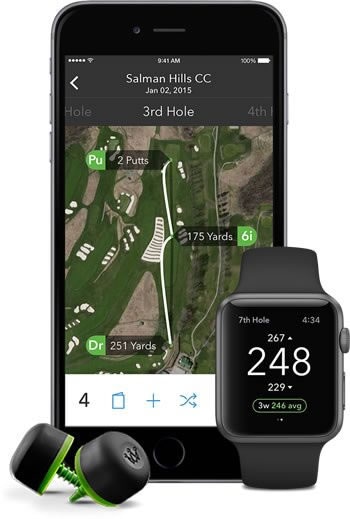
AmateurGolf.com puts Arccos Golf to the test -- it's easy to use, but the stats it provides can be brutally revealing
What if someone (or something) could do it all for you, much better, and automatically?
Arccos Golf hit the market last year with a game-tracking product that might be to impactful to learning and improving as the Trackman has been to club fitting. And get this -- the complete “kit” of hardware and software costs less than a new driver.
SETUP
Get started by having your golf bag and cell phone ready. Arccos comes with one of the coolest “manuals” I’ve encountered – it’s a well-designed set of laminated cards attached to a sturdy stainless steel wire. Flip through each card, and you’ll be done setting everything up in about five minutes. (Just to test this premise, I waited until 15 minutes before the tee time of my first Arccos round to see if I could do it and I made it to the tee with time to spare)
After simply screwing a lightweight Bluetooth device into the hole in the end of your grip, you open the app, and walk through a simple pairing process that has you hold down the end of the device until the app says “done pairing.” After that, it’s just a matter of downloading the course you’re going to play -- you can download all your regulars in advance – so that Arccos will be able to track you on the course.
HOW IT WORKS
The payoff for the very small amount of work getting started is that you’ve just turned your clubs into location-aware information gatherers that will very quickly begin telling your phone (remember they’re Bluetooth-connected) about every shot and putt you hit, from exactly where you hit it on the course. As long as you downloaded the course and hit “start round” you don’t need to look at your phone again. (You’ll need to keep it on your person for the accurate GPS readings, but you don’t have to fiddle with it.)
|
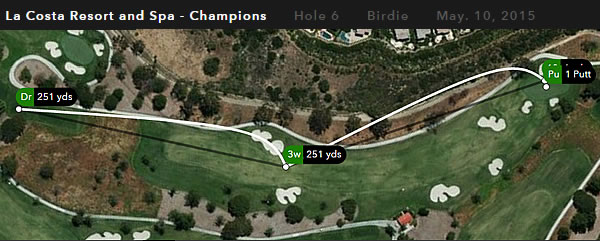
It's always nice to see
a birdie on your computer, iPhone, or iPad.
|
|
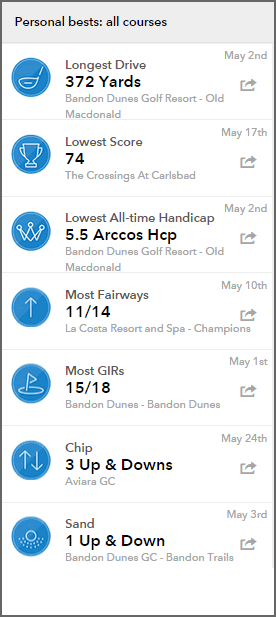
The editing of shots is a great first step in analyzing the round, and a great opportunity to fine- tune other data (for example if you putted from off the surface you can adjust it to be recorded as a chip, of if you hit into a hazard you can record a penalty). The ability to “drag-and-drop” allows for further refinement. Suffice to say I’ve used countless new technology products and Arccos lives up to its promise of letting you concentrate on golf while it does the tracking.
THE VALUE OF DATA
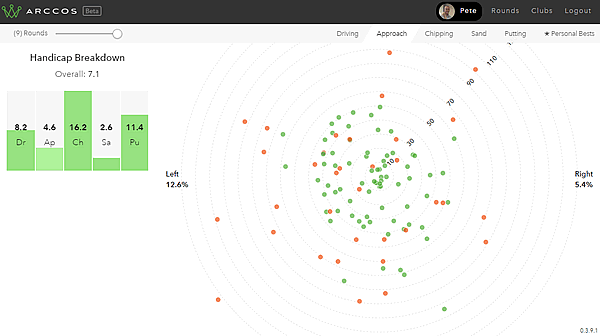
After your round, you’ll be able to quickly view a “stats” screen that has the kind of data that will show you where you need work. There are at least 25 different stats, categorized under scoring, driving, approach, chipping, and putting. It’s a game of percentages, and Arccos tells you how many times you miss your drives or approach shots left or right, and, of course, how long your average drive travels.
If you care enough to buy and install Arccos, you’re likely to want to drill down into that data.
But "Arccos Knows" what all of those individual stats mean, which is why the stats screen shows you an "Arccos Handicap" for your total game, then breaks it down by putting, approach shots, driving, chipping, and sand play. Those handicap numbers are the part of using Arccos that has hit my like a cold glass of water in the face, while motivating me at the same time. Because I can't expect to keep my overall handicap under 5 if my chipping handicap is a 16!
So now that there’s no question what I should work on, I’m not going to stop until the lines on the bar chart with my five different handicaps are all level.
To order Arccos, or learn more, visit their website at www.arccosgolf.com.
Next Up, Arccos Part 2: Taking it deeper and the Apple Watch App - STAY TUNED
|
A breakdown of
approach shot tendencies. Ignore the handicaps on the left! |
Most Popular Articles

Rory McIlroy Wins 2026 Seminole Pro-Member With Dad Gerry
Mar 2, 2026Rory McIlroy added another trophy to the mantle on golf’s most exclusive Monday, teaming with father Gerry at Seminole Golf Club.
U.S. Open Qualifying 2026: Local & Final Qualifying Sites for Shinnecock
Feb 19, 2026The road to Shinnecock Hills begins in April as 110 local qualifying sites and 13 final qualifying venues are set.
FINAL RESULTS: Gasparilla Invitational 2026
Feb 21, 2026Hayes Brown wins Gasparilla at 2-under, edging Peyton White by one, while Jeff Frazier claims the Senior title at Palma Ceia.
Yunseo Yang Wins Women’s Amateur Asia-Pacific at Royal Wellington Golf Club
Feb 15, 2026Yunseo Yang makes history as Korea’s first WAAP champion, earning major exemptions with a dominant win.
If You’re Entering the U.S. Open, Read This First: 2026 Qualifying Explained
Feb 16, 2026110 locals. One Longest Day. Zero margin. Here’s what you need to know before filing for the 2026 U.S. Open.Loading latest news...